Print current date
Wed 25. February 2026 | 2026-02-25Print current date with Mac Shortcuts app
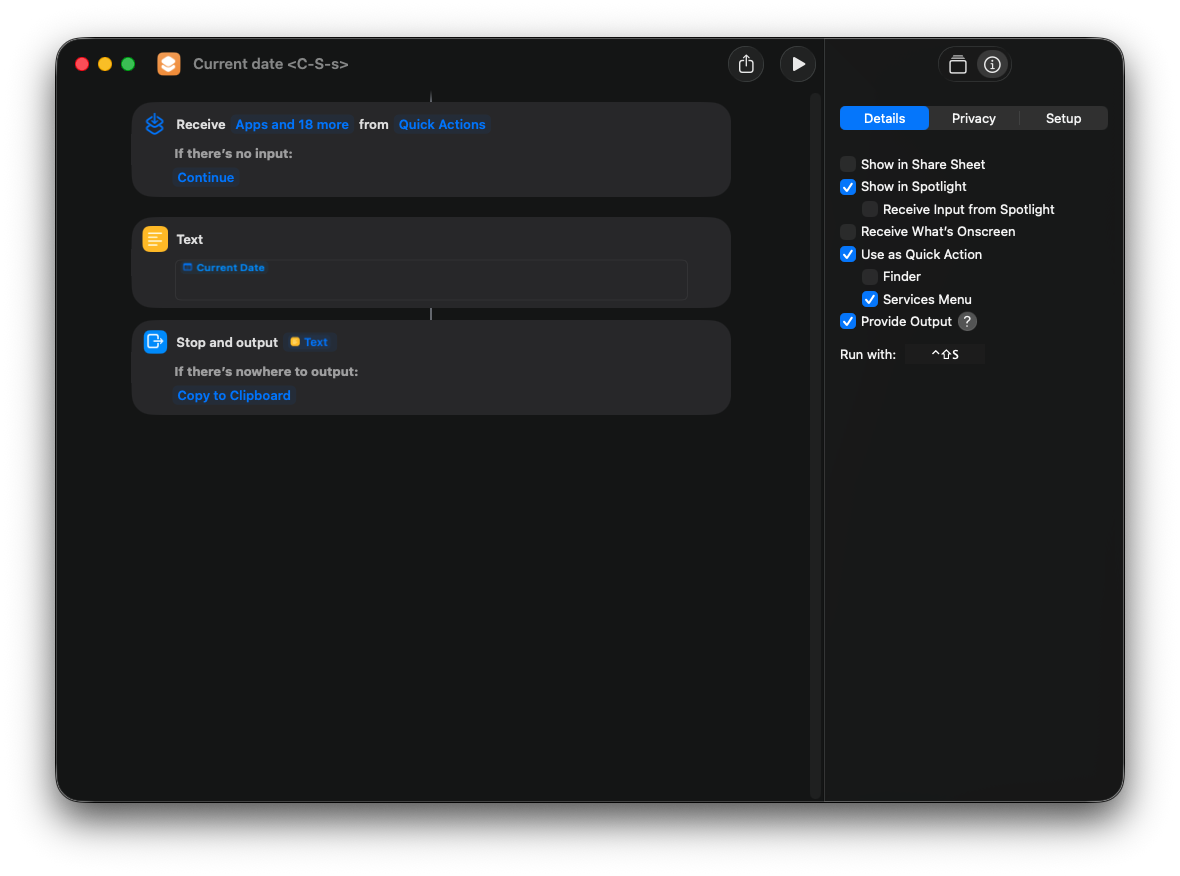
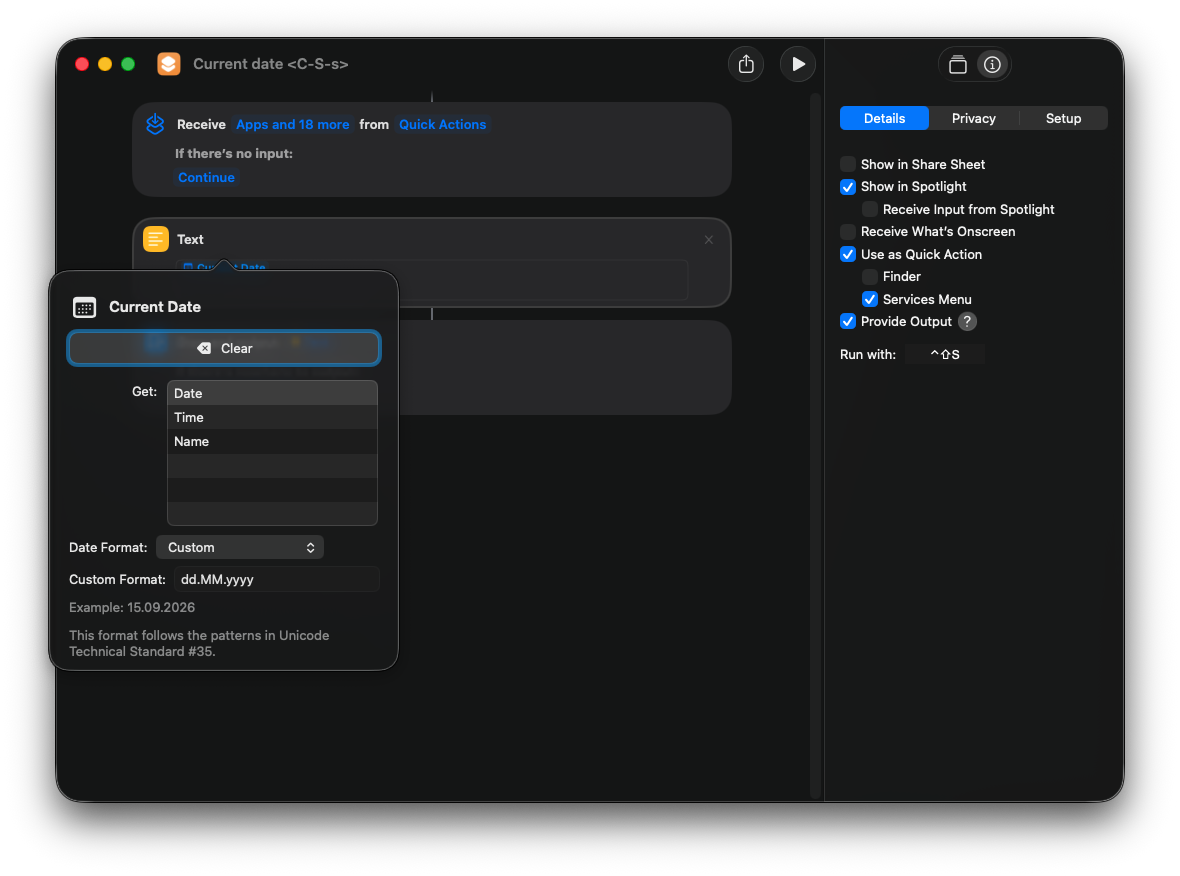


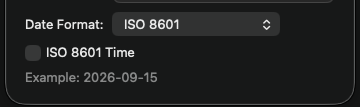
- Ctrl Alt a ---> 2026-02-25
- Ctrl Alt s ---> 25.02.2026
This card is mentioned in: https://useful-snippets.netlify.app/posts/autohotkey-replacements/
Print current date with Mac Shortcuts app
This card is mentioned in: https://useful-snippets.netlify.app/posts/autohotkey-replacements/
To activate pre-push, rename .git/hooks/pre-push.sample to .git/hooks/pre-push
#!/bin/sh

# An example hook script to verify what is about to be pushed.  Called by "git
# push" after it has checked the remote status, but before anything has been
# pushed.  If this script exits with a non-zero status nothing will be pushed.
#
# This hook is called with the following parameters:
#
# $1 -- Name of the remote to which the push is being done
# $2 -- URL to which the push is being done


#
# Information about the commits which are being pushed is supplied as lines to
# the standard input in the form:
#
#   <local ref> <local oid> <remote ref> <remote oid>
#
# This sample shows how to prevent push of commits where the log message starts
# with "WIP" (work in progress).

# feature/1673_replace_wootric
branch_name=$(git symbolic-ref HEAD 2>/dev/null)

GREEN='\033[0;32m'
RED='\033[1;91m'
RESET='\033[0m'

branch_name="$(git branch --show-current)"
allowed_branch_name="feature/1942_add_missing_translations"

# SPC SPC bran: ----> Copy branch name to clipboard

if [ "$branch_name" != "$allowed_branch_name" ]; then
  echo "Current branch: ${RED}${branch_name}${RESET}"
  echo "Allowed branch (f): ${GREEN}${allowed_branch_name}${RESET}" # = assigned to me - press "f" to checkout to it
  echo
  echo "Are you sure you want to push?"
  echo "  1) Yes, don't ask me again (updatecurrentprepush)"
  echo "  2) Yes"
  echo "  3) No"
  printf "Choice [1/2/3]: "
  read -r choice < /dev/tty

  case "$choice" in
    1)
      sed -i '' "s|^allowed_branch_name=.*|allowed_branch_name=\"${branch_name}\"|" "$0"
      exit 0
      ;;
    2)
      exit 0
      ;;
    *)
      echo "Push aborted."
      exit 1
      ;;
  esac
fi

# remote="$1"
# url="$2"
#
# zero=$(git hash-object --stdin </dev/null | tr '[0-9a-f]' '0')
#
# while read local_ref local_oid remote_ref remote_oid
# do
#     if test "$local_oid" = "$zero"
#     then
#         # Handle delete
#         :
#     else
#         if test "$remote_oid" = "$zero"
#         then
#             # New branch, examine all commits
#             range="$local_oid"
#         else
#             # Update to existing branch, examine new commits
#             range="$remote_oid..$local_oid"
#         fi
#
#         # Check for WIP commit
#         commit=$(git rev-list -n 1 --grep '^WIP' "$range")
#         if test -n "$commit"
#         then
#             echo >&2 "Found WIP commit in $local_ref, not pushing"
#             exit 1
#         fi
#     fi
# done

exit 0GREEN='\033[0;32m'
RED='\033[1;91m'
RESET='\033[0m'
branch_name="$(git branch --show-current)"
allowed_branch_name="my-branch"
if [ "$branch_name" != "$allowed_branch_name" ]; then
echo "Current branch: ${RED}${branch_name}${RESET}"
echo "Allowed branch: ${GREEN}${allowed_branch_name}${RESET}"
echo
echo "You can't push directly to this branch."
exit 1
fiEvt.
echo "Allowed branch (f): ${GREEN}${allowed_branch_name}${RESET}"hvis f er for å checkoute til den branchen:
alias fe="git checkout $(cat ~/assigned-feature-branch.txt)"Se dotfiles
sed -i "" "s&An example&$(git branch --show-current)\n# An example&" .git/hooks/pre-pushReplace "An example" with current branch \n # An example
echo $(git branch --show-current) | pbcopyFrom vim:
:!echo $(git branch --show-current) | pbcopyhttps://useful-snippets.netlify.app/posts/undo-soft-reset/
https://useful-snippets.netlify.app/posts/git-reflog/
git reset --soft HEAD~1git diff --no-index fil1.txt fil2.txt
git diff HEAD:fil1.txt HEAD:fil2.txt
git --no-pager diff
(remove hyphens)
{-% for $ITEM$ in $LIST$ %-}
  $END$
{-% endfor %-}console.log("$VAR$", $VAR$)se neovim config
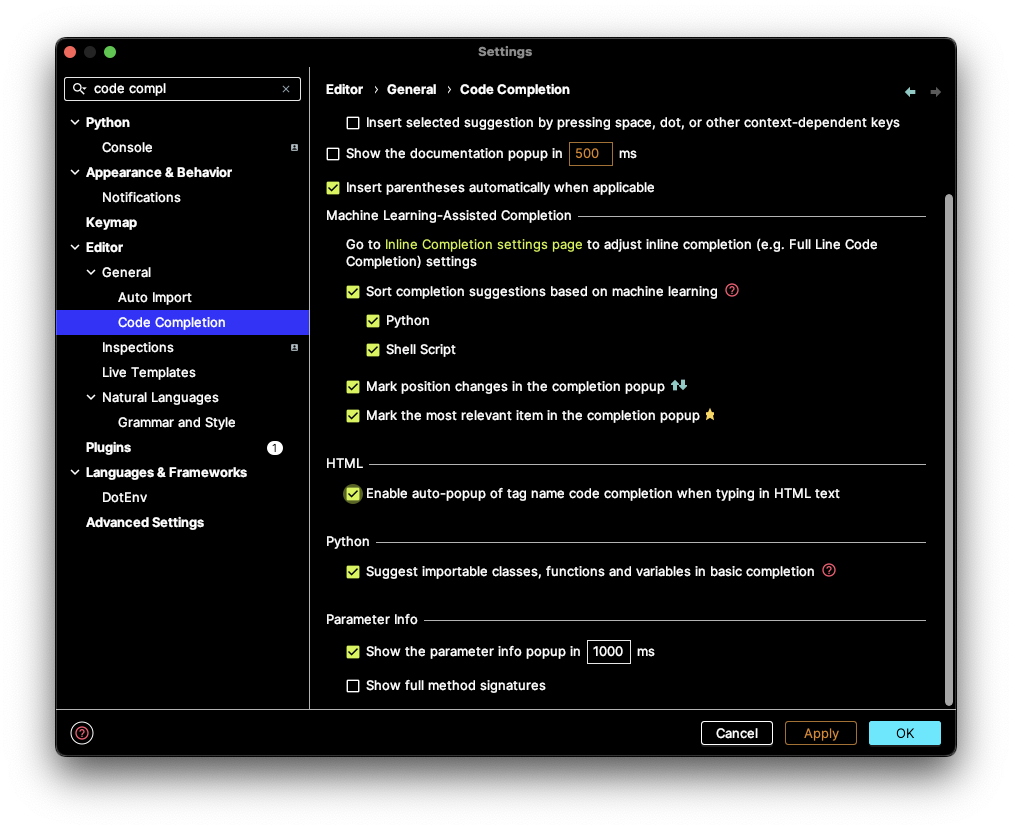
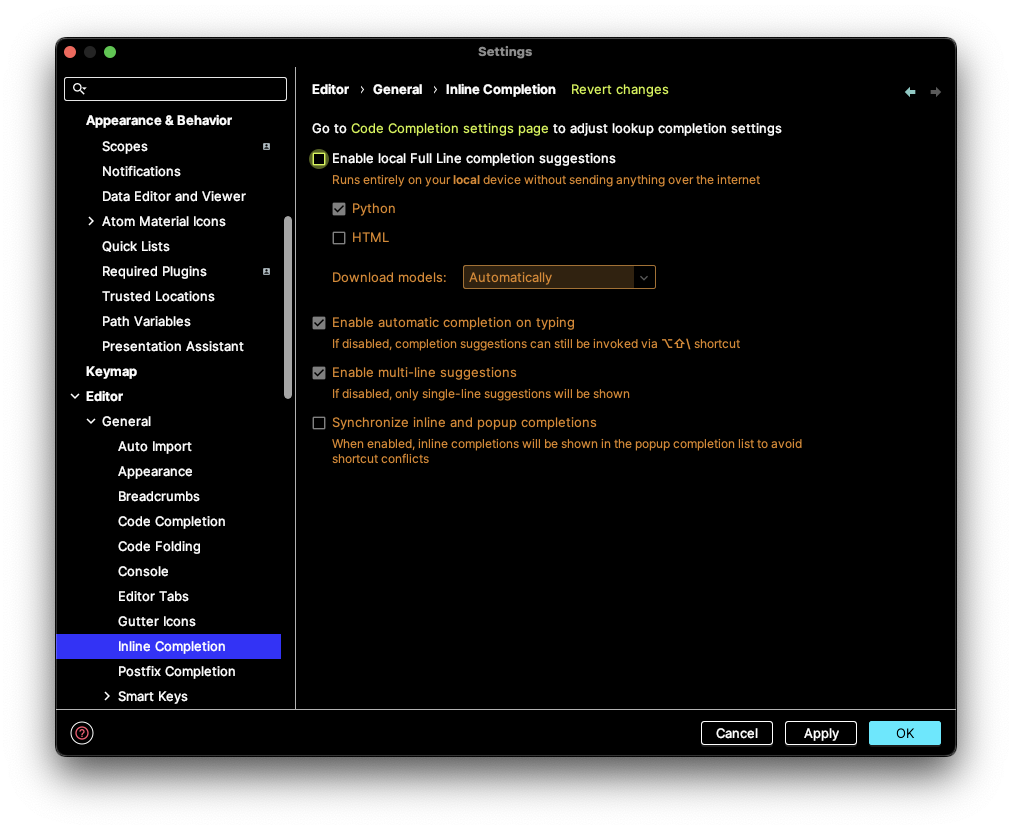
You can find all plugin settings at Preferences -> Editor -> General -> Code Completion -> Machine Learning-Assisted Completion -> Enable Full Line suggestions section.
https://plugins.jetbrains.com/plugin/14823-full-line-code-completion/documentation
Docs: https://docs.astral.sh/uv/
Install Python version: https://docs.astral.sh/uv/getting-started/features/#python-versions
uv python install <version>Uninstall python version
uv python uninstall <version> Initialize project
uv initSet correct python version in .python-version
(re)-build venv
uv venvUpdates .venv files
Activate venv environment
source .venv/bin/activatedeactivateInstall dependencies from requirements.txt
uv pip install -r requirements.txtInstall one single dependency
uv python add <package> Run package command
uv run <command> cd /mnt/c/Users/Pål Stakvik
bash entry i docker-compose
service-name:
    stdin_open: true
    tty: true
Exec bash i Dockerfile / docker run:
Start interactive shell on container:
docker run -it?
Already running container:
docker exec -it [container-name] /bin/bashGREEN='\033[0;32m'
RED='\033[1;91m'
RESET='\033[0m'echo -e "${RED}Found errors:${RESET}" echo -e "${GREEN}Success!${RESET}" https://gist.github.com/JBlond/2fea43a3049b38287e5e9cefc87b2124
| Value | Color |
|---|---|
| \e[0;30m | Black |
| \e[0;31m | Red |
| \e[0;32m | Green |
| \e[0;33m | Yellow |
| \e[0;34m | Blue |
| \e[0;35m | Purple |
| \e[0;36m | Cyan |
| \e[0;37m | White |
| Value | Color |
|---|---|
| \e[1;30m | Black |
| \e[1;31m | Red |
| \e[1;32m | Green |
| \e[1;33m | Yellow |
| \e[1;34m | Blue |
| \e[1;35m | Purple |
| \e[1;36m | Cyan |
| \e[1;37m | White |
| Value | Color |
|---|---|
| \e[4;30m | Black |
| \e[4;31m | Red |
| \e[4;32m | Green |
| \e[4;33m | Yellow |
| \e[4;34m | Blue |
| \e[4;35m | Purple |
| \e[4;36m | Cyan |
| \e[4;37m | White |
| Value | Color |
|---|---|
| \e[40m | Black |
| \e[41m | Red |
| \e[42m | Green |
| \e[43m | Yellow |
| \e[44m | Blue |
| \e[45m | Purple |
| \e[46m | Cyan |
| \e[47m | White |
| Value | Color |
|---|---|
| \e[0;90m | Black |
| \e[0;91m | Red |
| \e[0;92m | Green |
| \e[0;93m | Yellow |
| \e[0;94m | Blue |
| \e[0;95m | Purple |
| \e[0;96m | Cyan |
| \e[0;97m | White |
| Value | Color |
|---|---|
| \e[1;90m | Black |
| \e[1;91m | Red |
| \e[1;92m | Green |
| \e[1;93m | Yellow |
| \e[1;94m | Blue |
| \e[1;95m | Purple |
| \e[1;96m | Cyan |
| \e[1;97m | White |
| Value | Color |
|---|---|
| \e[0;100m | Black |
| \e[0;101m | Red |
| \e[0;102m | Green |
| \e[0;103m | Yellow |
| \e[0;104m | Blue |
| \e[0;105m | Purple |
| \e[0;106m | Cyan |
| \e[0;107m | White |
| Value | Color |
|---|---|
| \e[0m | Reset |
echo -e "\e[1mbold\e[0m"
echo -e "\e[3mitalic\e[0m"
echo -e "\e[3m\e[1mbold italic\e[0m"
echo -e "\e[4munderline\e[0m"
echo -e "\e[9mstrikethrough\e[0m"
echo -e "\e[31mHello World\e[0m"
echo -e "\x1B[31mHello World\e[0m"bash script.sh iiiif [[ "$1" == "iii" ]]; then
echo "første parameter er iii"
else
echo "første parameter er ikke iii"
fi| Action | Telescope | Fzf.vim |
|---|---|---|
| Open all items in quickfixlist | [Q] | Select all items with [Tab] and hit [Enter] |
| List all vim keymaps | require('telescope.builtin').keymaps | :Maps |
More on Telescope: https://useful-snippets.netlify.app/posts/vim/
Q for selecting all elements with fzf-lua:
config.defaults.keymap.fzf["ctrl-q"] = "select-all+accept"
From Lazyvim config: https://github.com/LazyVim/LazyVim/blob/main/lua/lazyvim/plugins/extras/editor/fzf.lua
Edit a file
nvim $(fzf)Restore a file from another branch (here: main)
git checkout main $(fzf)Run a specific test in Jest
npx jest --runTestsByPath $(fzf)