2023-10-22
Ifølge https://koukia.ca/rename-or-move-files-in-git-e7259bf5a0b7
Hvis du vil være sikker på at file history blir ivaretatt i en fil om du renamer den (eller flytter den), så må du bruke commando-linja og kjøre
git mv mycoolclass.cs myCoolClass.cs
eller
git mv layout/CardList common/List
Hvis du renamer direkte i editor-en, så kan du ikke være sikker på at git skjønner at det er samme fil.
Når du ivaretar git history så kan du bruke ting som git log -p --follow -- path/to/filename. Se gist: https://gist.github.com/paalss/7127b421ff7f3a862ae8d76c772aeb6a
Kommentarer:
Mulig det er unødvendig å bruke mv. Da jeg renamet og flyttet layout/CardList til common/List så skjønte git at disse to filene var 74% like.
git log -p --follow components/common/List/List.tsx funker fjell. Historikken strekker seg tilbake til før renamingen
2023-10-22
Links
2023-10-22
source /usr/share/bash-completion/completions/git
__git_complete gco _git_checkout
__git_complete gb _git_branch
__git_complete gbs _git_bisect
__git_complete ga _git_add
__git_complete gcmsg _git_commit
__git_complete gcs _git_commit
__git_complete gd _git_diff
__git_complete gl _git_pull
__git_complete gp _git_push
__git_complete gm _git_merge
2023-10-22
Vise kort commit hash
git rev-parse --short HEAD
2023-10-29
Færre antall branches i code completion suggestion når du skriver git checkout feat-[Tab].
Slett alle branches som ikke finnes på remote:
git fetch -p
(git fetch prune)
Også, sørg for å slette unødvendige tags
List tags
git tag
git tag -d tagName
2023-11-05
Git grep way
Eg. Search for "use-query-params" in package.json's git history
git grep use-query-params $(git rev-list --all -- package.json) -- package.json
As a function in .bashrc/.zshrc-file
filehistorysearch() {
git grep $1 $(git rev-list --all -- $2) -- $2
}
Alternatively, git log way
git log -S <pattern>
https://will-keleher.com/posts/small-programming-tricks-matter/
2024-05-20
https://useful-snippets.netlify.app/posts/git-reset-soft/
https://useful-snippets.netlify.app/posts/git-reflog/
git reflog
copy hash (ex: 56e2f8f)
git checkout main/develop
git merge 56e2f8f
2024-10-21
git ls-files -u | sed -n 's,3\t,0\t,p' | git update-index --index-info
git checkout-index -af
https://stackoverflow.com/questions/73388057/in-git-after-merging-some-files-i-want-to-accept-all-theirs-that-are-left-in?rq=3
2025-05-12
https://jvns.ca/blog/2023/11/06/rebasing-what-can-go-wrong-/
2025-08-11
Reverse apply changes from old commit
git checkout <commit-hash>
git log
git diff <previous-commit-hash> > diff.patch
git checkout <main-or-up-to-date-branch>
git apply diff.patch --reverse
Create new commit that revert last commit
git revert <last-commit-hash>
2025-10-16
<!--
git rebase -X theirs main
git rebase -X theirs develop -i
-->
git tag branch_before_rebase
git rebase -X theirs develop
- Manually compare current branch with
branch_before_rebase
- Correct whatever needs to be corrected
2025-10-31
CLI
git diff main..HEAD
git diff main..$(git branch --show-current)
If MR author forgot to bring feature up to date with main.
Compare against main at the time when branch was created.
git diff $(git merge-base main HEAD) HEAD
git show $(git branch --show-current)
git branch --show-current is current branch
Lazygit
- Highlight main branch
- Shift w & hit enter
- highlight the branch you want to compare with
Webstorm
- GitToolBox? Should not be necessary I think
https://useful-snippets.netlify.app/posts/webstorm-compare-with-branch/
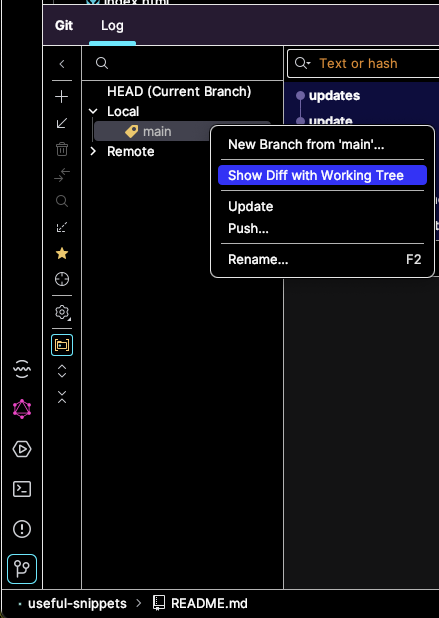
VS Code
- Gitlens?
Neovim
- Diffview
2025-11-13
git restore --staged file-name.txt
2025-12-02
git checkout another-local-branch path/to/file.js
2025-12-02
Go forward / List ancestry (later) commits
From HEAD (older commit) to main branch (up-to-date)
git log --reverse --ancestry-path HEAD^..main
stuff
git checkout HEAD^
git checkout HEAD@{1}
2026-02-23
Sammenlign to filer i current directory:
git diff --no-index fil1.txt fil2.txt
Sammenlign to committede filer
git diff HEAD:fil1.txt HEAD:fil2.txt
Uten pager (| delta)
git --no-pager diff
2026-02-23
https://useful-snippets.netlify.app/posts/undo-soft-reset/
https://useful-snippets.netlify.app/posts/git-reflog/
git reset --soft HEAD~1
2026-02-25
To activate pre-push, rename .git/hooks/pre-push.sample to .git/hooks/pre-push
Example script (ask dev to confirm before pushing on wrong branch)
#!/bin/sh
branch_name=$(git symbolic-ref HEAD 2>/dev/null)
GREEN='\033[0;32m'
RED='\033[1;91m'
RESET='\033[0m'
branch_name="$(git branch --show-current)"
allowed_branch_name="feature/1942_add_missing_translations"
if [ "$branch_name" != "$allowed_branch_name" ]; then
echo "Current branch: ${RED}${branch_name}${RESET}"
echo "Allowed branch (f): ${GREEN}${allowed_branch_name}${RESET}"
echo
echo "Are you sure you want to push?"
echo " 1) Yes, don't ask me again (updatecurrentprepush)"
echo " 2) Yes"
echo " 3) No"
printf "Choice [1/2/3]: "
read -r choice < /dev/tty
case "$choice" in
1)
sed -i '' "s|^allowed_branch_name=.*|allowed_branch_name="${branch_name}"|" "$0"
exit 0
;;
2)
exit 0
;;
*)
echo "Push aborted."
exit 1
;;
esac
fi
exit 0
Example script (prevent pushes on wrong branch)
GREEN='\033[0;32m'
RED='\033[1;91m'
RESET='\033[0m'
branch_name="$(git branch --show-current)"
allowed_branch_name="my-branch"
if [ "$branch_name" != "$allowed_branch_name" ]; then
echo "Current branch: ${RED}${branch_name}${RESET}"
echo "Allowed branch: ${GREEN}${allowed_branch_name}${RESET}"
echo
echo "You can't push directly to this branch."
exit 1
fi
Evt.
echo "Allowed branch (f): ${GREEN}${allowed_branch_name}${RESET}"
hvis f er for å checkoute til den branchen:
alias fe="git checkout $(cat ~/assigned-feature-branch.txt)"
Se dotfiles
Insert the current branch into the top of the pre-push file
sed -i "" "s&An example&$(git branch --show-current)\n# An example&" .git/hooks/pre-push
Replace "An example" with current branch \n # An example
Copy current branch to Mac clipboard
echo $(git branch --show-current) | pbcopy
From vim:
:!echo $(git branch --show-current) | pbcopy
2026-03-18
Visual mark code
Webstorm: "Show history for selection"
Neovim: :<,>DiffviewFileHistory<CR>
2026-03-19
https://useful-snippets.netlify.app/posts/git-reset-soft/
https://useful-snippets.netlify.app/posts/undo-soft-reset/
git reflog find commit before resetgit checkout <commit>git log verify that this commit includes the resetted commitgit branch --force <original-branch-name>git checkout <original-branch-name>
References
2026-04-22
notes:
- rename in lazygit
git push $remote --delete $old_namegit push origin HEAD
This will close any existing PR if exists
old_name=feature/old
new_name=feature/new
remote=origin
git branch -m $old_name $new_name
git push $remote --delete $old_name
git push $remote :$old_name
git branch --unset-upstream $new_name
git push $remote $new_name
git push $remote -u $new_name
https://stackoverflow.com/questions/30590083/git-how-to-rename-a-branch-both-local-and-remote/30590238#30590238
At a glance: Branch renaming commands
Task Command
Rename current branch git branch -m new-name
Rename specific branch git branch -m old-name new-name
Delete remote branch git push origin --delete branch-name
Push renamed branch git push origin new-name
Set upstream tracking git push --set-upstream origin new-name
https://www.codecademy.com/article/rename-git-branch
git branch -m new-branch-name
https://www.freecodecamp.org/news/git-rename-branch-how-to-change-a-local-branch-name/