2021-03-26
Relatert
Eksempel
Scenario
Port er opptatt:
Git bash
$ docker-compose up -d
Creating network "lamp_default" with the default driver
Creating lamp_adminer_1 ...
Creating lamp-redis     ...
Creating lamp-database  ... error
Creating lamp_adminer_1 ... done
Creating lamp-redis     ... done
ccess a socket in a way forbidden by its access permissions.
ERROR: for database  Cannot start service database: Ports are not available: listen tcp 127.0.0.1:3306: bind: An attempt was made to access a socket in a way forbidden by its access permissions.
ERROR: Encountered errors while bringing up the project.
Finne hvillket program som bruker det
$ netstat -ano | findstr '3306'
  TCP    0.0.0.0:3306           0.0.0.0:0              LISTENING       5028
  TCP    [::]:3306              [::]:0                 LISTENING       5028
$ tasklist | findstr '5028'
mysqld.exe                    5028 Services                   0      4,144 K
Resultat
mysqld.exe
https://veerasundar.com/blog/2009/10/how-to-check-which-application-is-using-which-port/
2023-10-22
https://github.com/paalss/nvim/blob/master/docs/neovim-install.md
2023-10-22
Ifølge https://koukia.ca/rename-or-move-files-in-git-e7259bf5a0b7
Hvis du vil være sikker på at file history blir ivaretatt i en fil om du renamer den (eller flytter den), så må du bruke commando-linja og kjøre
git mv mycoolclass.cs myCoolClass.cs
eller
git mv layout/CardList common/List
Hvis du renamer direkte i editor-en, så kan du ikke være sikker på at git skjønner at det er samme fil.
Når du ivaretar git history så kan du bruke ting som git log -p --follow -- path/to/filename. Se gist: https://gist.github.com/paalss/7127b421ff7f3a862ae8d76c772aeb6a
Kommentarer:
Mulig det er unødvendig å bruke mv. Da jeg renamet og flyttet layout/CardList til common/List så skjønte git at disse to filene var 74% like.
git log -p --follow components/common/List/List.tsx funker fjell. Historikken strekker seg tilbake til før renamingen
2023-10-22
nano ~/.nanorc
sett inn
https://gist.github.com/keithamus/736220/5e069767b22841610ee18fd2f92bd6026f5eb41d
syntax "gitcommit" "COMMIT_EDITMSG$"
color white "#.*"
color green "#.(modified|added|deleted|unmerged|copy-edit|rename).*"
color yellow start="# Changes.*" end="# Changed.*"
color brightgreen "^\+.*"
color brightred "^-.*"
color brightyellow "(diff|index|---|\+\+\+).*"
color brightmagenta "@@.*"
color white "# Changes .*"
color white "# Changed .*"
color white "#.*\(use .*"
color white "#$"
=
farger i git commit vinduet!
2023-10-22
https://paalss.github.io/oh-my-aliases/
Hvordan starte med ohmybash, velge theme og laste ned nødvendig font icons
Installasjon
bash -c "$(curl -fsSL https://raw.githubusercontent.com/ohmybash/oh-my-bash/master/tools/install.sh)"
Du får med masse aliases med dette. List alle med alias
Velge theme
nano ~/.bashrc
OSH_THEME="agnoster"
Save & exit: ctrl + x, y, [Enter]
Reload:
. ~/.bashrc
Hvis du har mellomrom i path to oh-my-bash insallation, slik:
# Path to your oh-my-bash installation.
export OSH=/c/Users/Pål Stakvik/.oh-my-bash
Må du enkapsulere path-en i quotes, ellers får du error
skaffe nødvendige font icons
evt. se på agnoster-zsh-theme
last ned Hack-fonten
- Gå til https://sourcefoundry.org/hack/ og last ned font. Windows executable funker for WSL og VS Code
- Kjør executable i nedlastninger
- Godta restart
Sette WSL til å bruke riktig font
- Åpne WSL
- høyreklikk toppmeny, velg 'properties'
- velg "Hack" fonten

Sette VS Code til å bruke riktig font
- ctrl + shift + p
- settings.json
- lim inn
"terminal.integrated.fontFamily": "Hack",
https://stackoverflow.com/questions/37895501/display-issue-with-oh-my-zsh-agnoster-theme#answer-38475948

Erstatte user @ hostname
...Med kun hostname:
prompt_context() {
  if [[ "$USER" != "$DEFAULT_USER" || -n "$SSH_CLIENT" ]]; then
    prompt_segment black default "$USER"
  fi
}
Eller hva det skal være:
prompt_segment black default "P"

prompt_segment black default "%(!.%{%F{yellow}%}.)$USER" skal visstnok også funke, men jeg får bare slik tekst da:

Git bash merknader
Får du permission denied ved git add .?
- Kjør VS Code som administrator
Får du
hint: Waiting for your editor to close the file... 'C:\Users\Pål' is not recognized as an internal or external command,
operable program or batch file.
error: There was a problem with the editor '"C:\Users\Pål Stakvik\AppData\Local\Programs\Microsoft VS Code\bin\code.cmd" --wait'.
Please supply the message using either -m or -F option.
ved git commit (-v)
- Prøv å kjør
git config --global core.editor "code --wait". Les mer https://stackoverflow.com/questions/52195877/how-can-i-fix-git-commit-error-waiting-for-your-editor-to-close-the-file-wi
2023-10-22
Installer på Ubuntu (WSL)
sudo apt-get install taskwarrior
https://taskwarrior.org/download/
Oppstart
task version
yes for å lage config file (.taskrc)
Bruk
📍 Legg til task
task add bla bla bla bla
📌 - med priority
task priority:H add bla bla bla bla
📅📃 List opp alle tasks
task next
next kan sløyfes
✔ Gjennomfør task nr X
task X done
❌ 🗑 Slett
task X delete
https://taskwarrior.org/docs/30second/
💬🗨 Se og rediger alle detalljer
task X edit
🗃 Opprett i prosjekter
task add project:Kitchen Select floor tiles
task add project:Kitchen Measure counter-top
task add project:Kitchen Design placement of electrical outlets
task add project:Kitchen Locate ideal placement for extractor duct
task add project:Kitchen Select and order counter-top material
task add project:Kitchen Talk to the Electrician about when the work can start
https://taskwarrior.org/docs/best-practices/
Interessant
2023-10-29
Færre antall branches i code completion suggestion når du skriver git checkout feat-[Tab].
Slett alle branches som ikke finnes på remote:
git fetch -p
(git fetch prune)
Også, sørg for å slette unødvendige tags
List tags
git tag
git tag -d tagName
2023-10-29
npm i bootstrap-toc@npm:bootstrap@5.1.3 --save-exact
npm i bootstrap@5.2.3 --save-exact
usage
const bootstrap = require("bootstrap-toc/dist/js/bootstrap.bundle.min.js");
new bootstrap.ScrollSpy(document.body, {
target: "#scroll-nav",
offset: 100,
});
2023-10-29
WSL
explorer.exe .
Mac terminal
open .
2023-11-05
Git grep way
Eg. Search for "use-query-params" in package.json's git history
git grep use-query-params $(git rev-list --all -- package.json) -- package.json
As a function in .bashrc/.zshrc-file
filehistorysearch() {
git grep $1 $(git rev-list --all -- $2) -- $2
}
Alternatively, git log way
git log -S <pattern>
https://will-keleher.com/posts/small-programming-tricks-matter/
2023-12-08
Prøv å kjøre npx prettier filenamepath --writefør du formatterer i webstorm/VSCode
2023-12-08
List processes
related
All
sudo netstat -nlp | grep tcp
Sudo gives more info on process id & stuff
One specific port
sudo lsof -i:3000
sudo lsof -i:80
sudo lsof -i:443
sudo lsof -i:4173
Kill process
By name
killall -9 node
sudo killall -9 caddy related: https://useful-snippets.netlify.app/posts/quit-caddy-process/
sudo killall -9 http-server
By PID
eg: tcp6 0 0 :::3000 :::* LISTEN 1686/node
__________________________________^^______
killall -9 1686
By port
eg: tcp6 0 0 :::3000 :::* LISTEN 1686/node
________________^^________________________
sudo killall $(lsof -t -i:3000)
Eller med
fuser -k 3000/tcp
2023-12-25
sudo caddy stop
related
- Try:
sudo ps -eaf | grep -i caddy
- Try:
sudo -s (Enter sudo shell)
caddy stopexit
2024-01-01
for f in *.js; do mv -- "$f" "${f%.js}.tsx"; done
https://unix.stackexchange.com/questions/19654/how-do-i-change-the-extension-of-multiple-files
2024-01-06
Remove changes made to node_modules!
Remove ~/.npm
Delete node_modules
Reinstall
2024-01-06
Start
tror det er viktig å uninstalle @scope/library først?
npm link in librarynpm link @scope/library in app
See if npm link works
Run npm run build in the library. See if it updates the app.
If stuff doesn't update in app, try
- Restart app's dev server
- Try as suggested in response from
npm cache clean:
npm install --cache /tmp/empty-cache
Then restart app dev server
Maybe try this on the app side
npm unlink @scope/librarynpm link @scope/library
Maybe also try this on the library side
npm unlink @scope/librarynpm link
I don't think it's necessary to uninstall library from node modules.
If app cant find css
attempting to import css from app (like with bootstrap css) does not always work for some reason
inject css into js so that the package imports css by itself
Reference
When npm link works, npm ls @scope/package should return:
app@0.1.0 /home/user/code/app
└── @scope/package@0.1.0 extraneous -> ./../packages/package-components-project
Useful information about npm link and cleaning up and stuff, see README!: https://github.com/jasonsturges/vite-typescript-npm-package
2024-01-25
https://ubuntu.com/server/docs/upgrade-introduction
sudo apt update
sudo apt upgrade
2024-02-06
Run "npm run build" 10 times
for i in {1..10}; do npm run build; done
Wait beetween commands
for i in {1..10}; do npm run build && sleep 1; done
2024-02-15
- Stdin 0< or <
- Stdout 1 or >
- Stderr 2>
2024-08-23
WSL ubuntu
lsb_release -a
Windows Command Prompt
wsl --version
2024-10-21
git ls-files -u | sed -n 's,3\t,0\t,p' | git update-index --index-info
git checkout-index -af
https://stackoverflow.com/questions/73388057/in-git-after-merging-some-files-i-want-to-accept-all-theirs-that-are-left-in?rq=3
2025-06-06
stat filename
or
ls -l
Change ownership
chmod o=rx filename
2025-10-09
Grep:
grep -4 \"peerDependencies\" node_modules/stylelint-config-standard-scss/package.json
Ripgrep:
rg peerDependencies
2025-10-16
<!--
git rebase -X theirs main
git rebase -X theirs develop -i
-->
git tag branch_before_rebase
git rebase -X theirs develop
- Manually compare current branch with
branch_before_rebase
- Correct whatever needs to be corrected
2025-10-30
https://github.com/cypress-io/cypress-docker-images/tree/master/factory
2025-10-31
CLI
git diff main..HEAD
git diff main..$(git branch --show-current)
If MR author forgot to bring feature up to date with main.
Compare against main at the time when branch was created.
git diff $(git merge-base main HEAD) HEAD
git show $(git branch --show-current)
git branch --show-current is current branch
Lazygit
- Highlight main branch
- Shift w & hit enter
- highlight the branch you want to compare with
Webstorm
- GitToolBox? Should not be necessary I think
https://useful-snippets.netlify.app/posts/webstorm-compare-with-branch/
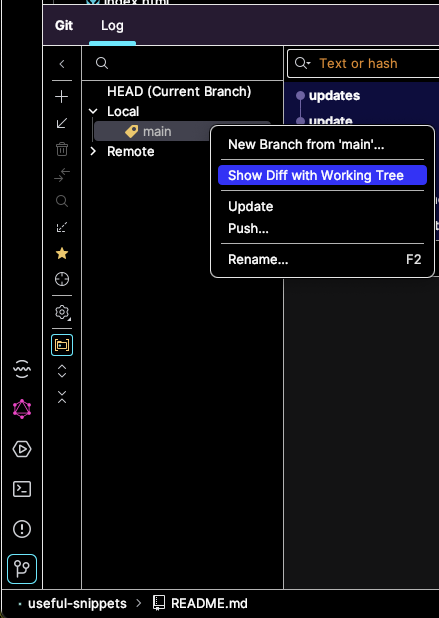
VS Code
- Gitlens?
Neovim
- Diffview
2025-11-13
git restore --staged file-name.txt
2026-01-11
cd /mnt/c/Users/Pål Stakvik
2026-04-04
mulig du må fjerne denne blueprint.md filen og referansen til den i cloudcannon config'en for at schema'et skal bli brukt.
2026-04-04
https://stackoverflow.com/questions/2249852/how-to-apply-a-patch-generated-with-git-format-patch
First the stats:
git apply --stat a_file.patch
Then a dry run to detect errors:
git apply --check a_file.patch
Finally, you can use git am to apply your patch as a commit. This also allows you to sign off an applied patch.
This can be useful for later reference.
git am --keep-cr --signoff < a_file.patch